Ensure a minimum number of owners
AI translated from the German original
Ensure that every workspace has enough owners.
Multiple owners reduce the risk of orphaned workspaces or channels and ensure ongoing management:
- Continuity: The workspace remains managed even if an owner is absent or leaves.
- Availability: A contact person for access requests, guests and reviews is always available.
Set the minimum number
Section titled “Set the minimum number”- Open Groups → Templates → organisation → template → Group.
- Under Permissions → Minimum number of owners, enter the number.
- Save the template.
How Seamless ensures this
Section titled “How Seamless ensures this”- On request: Seamless checks whether the minimum number of owners is entered.
- During review: The number of owners is checked as well.
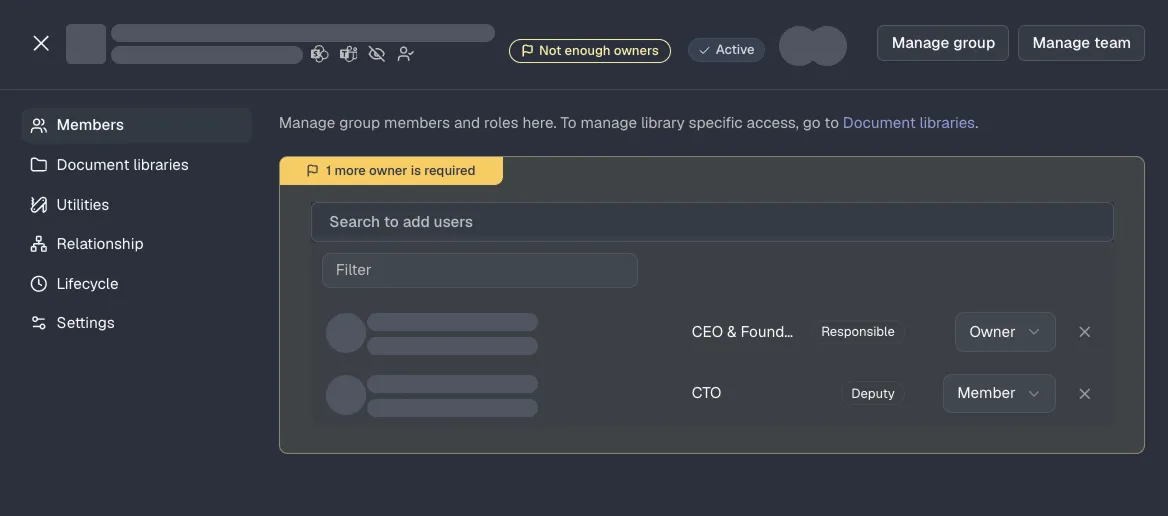
- In operation: The Owner background job flags workspaces with too few owners and informs the primary contact via the Teams activity feed. The job must be enabled under Monitoring → Jobs.
If owners are missing, Seamless shows this in the workspace: